
In today’s competitive real estate market, first impressions happen online long before a buyer ever steps through the front door. Digital property brochures have become indispensable real estate marketing materials, replacing clunky printed flyers with interactive, visually rich experiences that drive engagement and close deals faster.
Whether you’re a real estate agent managing dozens of listings, a property developer launching a new community, or a brokerage looking to stand out, this guide walks you through everything you need to know about creating professional digital property brochures—from planning and design to publishing and sharing.
Why Digital Property Brochures Are Essential Real Estate Marketing Materials
The National Association of Realtors reports that 97% of homebuyers use the internet during their property search. That means your marketing materials need to live where your buyers are—on screens, not in mailboxes.

Digital property brochures offer several advantages over traditional print:
- Instant distribution: Share via email, social media, QR codes, or embed directly on your website
- Rich media: Include virtual tours, video walkthroughs, and interactive floor plans
- Cost-effective: No printing, shipping, or waste—update listings in real time
- Analytics: Track who viewed your brochure, which pages they lingered on, and what links they clicked
- Professional presentation: A sleek flipbook format creates an immersive browsing experience that static PDFs cannot match
If you’re still relying on printed materials alone, you’re leaving serious money on the table. Digital brochures help agents present listings with the polish of personalized digital brochure examples that build brand trust and drive conversions.
What to Include in a Real Estate Property Brochure
Before opening any design tool, plan your content. A well-structured property brochure typically includes:

1. Cover Page With a Hero Image
Your cover sets the tone. Use a high-resolution exterior photograph of the property with the listing address, price (if appropriate), and your agency branding. Think of it as your digital curb appeal.
2. Property Overview
Summarize key details in a scannable format: bedrooms, bathrooms, square footage, lot size, year built, and any standout features (smart home, solar panels, pool). Buyers want to qualify the property quickly before diving deeper.
3. Photo Gallery and Virtual Tour
Include 10–20 professional photos covering the exterior, living areas, kitchen, bedrooms, bathrooms, outdoor space, and neighborhood. With a digital brochure tool like FlipHTML5, you can embed 360° virtual tours and video walkthroughs directly into the pages—something a printed brochure could never do.
4. Floor Plans
Interactive or annotated floor plans help buyers understand layout and flow. Label each room with dimensions, and consider layering furniture placement for staging context.
5. Neighborhood and Amenities
Buyers aren’t just purchasing a home—they’re buying into a community. Include an interactive map, nearby schools and ratings, commute times, parks, dining options, and any HOA amenities.
6. Agent Contact and CTA
End with a clear call-to-action: schedule a showing, request more info, or apply. Include your headshot, phone number, email, and social links. Make it effortless for the reader to take the next step.
For more content inspiration, review these brochure design tips and content ideas that help generate leads.
Step-by-Step: How to Create a Digital Property Brochure
Let’s walk through the actual creation process, from design to digital publishing.
Step 1: Prepare Your Assets
Gather all property photos, floor plans, copy, and branding elements. Organize them into folders by section (cover, gallery, floor plans, neighborhood). This keeps your workflow smooth and prevents last-minute scrambling.

Professional photography is non-negotiable. According to Redfin, homes with professional photos sell for $3,400–$11,200 more than those without. Invest in a photographer who understands real estate staging and lighting.
Step 2: Design Your Brochure Layout
You have two main approaches:
- Design from scratch using tools like Canva, InDesign, or PowerPoint, then export to PDF
- Use a template from a brochure maker to speed up the process
For real estate brochures, a clean, image-forward layout works best. Think full-bleed photos with minimal text overlays. Explore brochure layout ideas for inspiration on structuring pages that hold attention.
Key design principles:
- Use consistent brand colors and fonts throughout
- Limit text to essential details—let photos do the heavy lifting
- Maintain generous white space for a luxury, professional feel
- Place CTAs strategically on every spread, not just the last page
Step 3: Convert to a Digital Flipbook
Once your brochure PDF is ready, transform it into an interactive digital flipbook. This is where the magic happens—instead of a flat, lifeless PDF, your brochure becomes a page-turning experience that feels like browsing a high-end magazine.
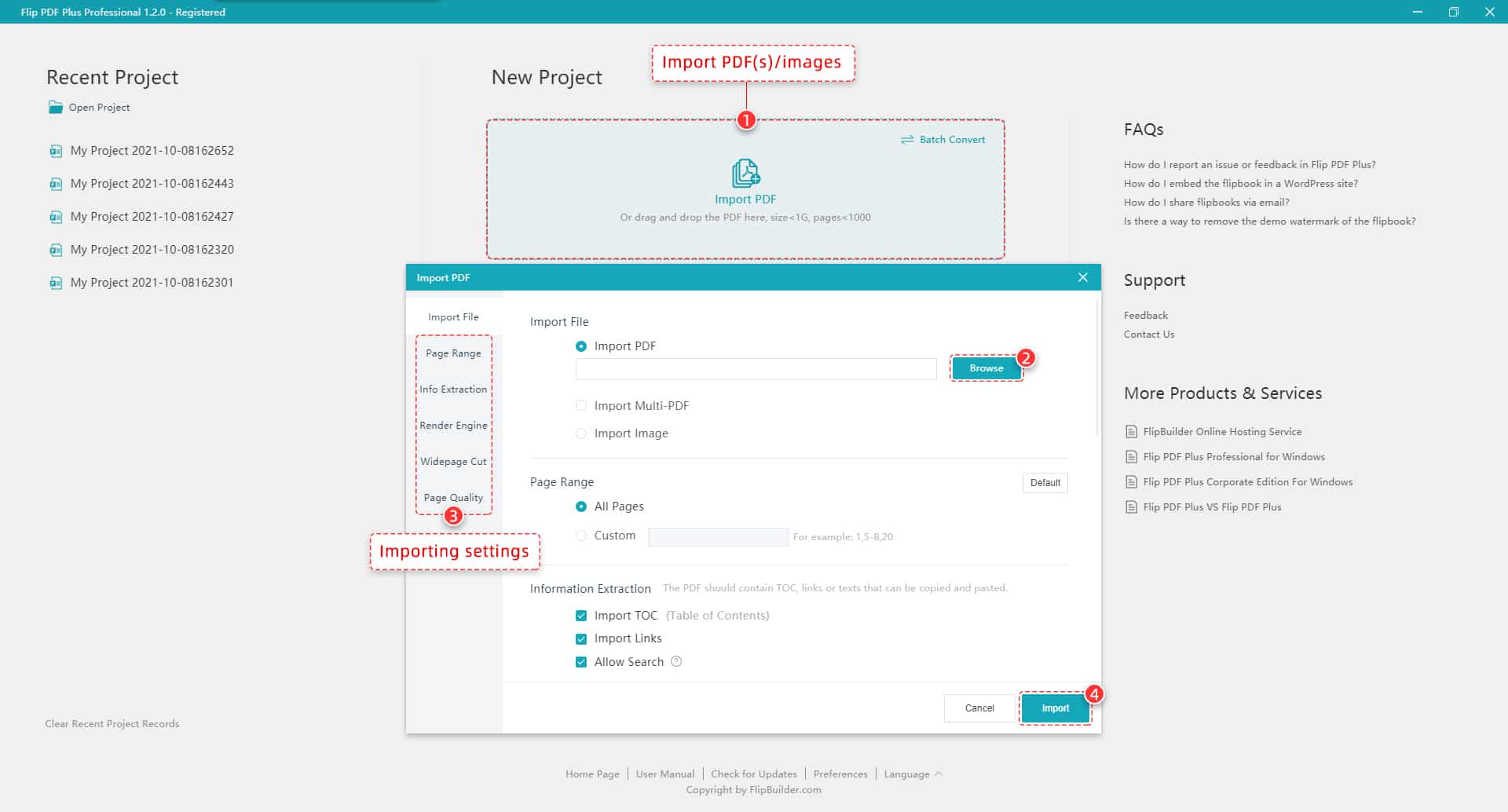
With FlipBuilder, you can upload your PDF and instantly generate a flipbook with realistic page-turning animations. The desktop software (Flip PDF Pro) gives you granular control over multimedia embedding, while the online platform FlipHTML5 lets you publish directly to the cloud with zero software installation.
Key features to leverage:
- Embedded video: Add property walkthrough videos from YouTube or Vimeo directly into brochure pages
- Interactive hotspots: Link specific areas of a floor plan to the corresponding photo gallery
- Audio narration: Record a guided tour that plays as the buyer flips through pages
- Clickable buttons: “Schedule a Showing” buttons linked to your calendar booking page
Step 4: Customize and Brand
Customize the viewer to match your agency’s branding. Set your logo, brand colors for the toolbar, and add a custom domain if your platform supports it. A consistent brand experience strengthens your identity across every touchpoint.

Step 5: Publish and Share
Publish your brochure online and distribute it across all your marketing channels:
- MLS listings: Include a flipbook link in the virtual tour or documents section
- Email campaigns: Embed a thumbnail preview that links to the full brochure
- Social media: Share the link on Instagram, Facebook, and LinkedIn with a preview image
- QR codes: Print QR codes on yard signs, open house sign-in sheets, and business cards
- Website embed: Embed the flipbook directly on your property listing page
FlipHTML5’s cloud publishing features make sharing instant—generate a shareable link, embed code, or download for offline use, all in one click.
Design Tips Specific to Real Estate Brochures
Real estate is a visual industry, and your brochure needs to reflect that. Here are targeted design tips:

Use Lifestyle Photography, Not Just Rooms
Show how spaces are lived in—a family dinner in the kitchen, a couple relaxing on the patio, kids playing in the backyard. Lifestyle photography helps buyers emotionally connect with a property.
Highlight the Neighborhood Story
Dedicate at least one spread to the surrounding area. Include local coffee shops, parks, school ratings, and walkability scores. This context differentiates your brochure from competitors who only focus on the house itself.
Leverage Interactive Elements
Digital brochures unlock possibilities that print never could. Embed Google Maps for location context, add clickable links to school district websites, and include embedded mortgage calculators. These interactive features keep the reader engaged longer and position you as a tech-forward agent. For more creative techniques, check out these DIY brochure ideas and creative design approaches.
Optimize for Mobile Viewing
Most property searches happen on mobile devices. Ensure your flipbook is responsive, loads quickly, and reads well on smaller screens. Test every page on both phone and tablet before distributing.
Tools for Creating Professional Real Estate Brochures
Choosing the right tools can dramatically speed up your workflow. Here’s a recommended stack:
For Design
- Canva: Drag-and-drop simplicity with real estate templates
- Adobe InDesign: Industry standard for print-quality layouts
- PowerPoint/Google Slides: Quick and accessible for basic brochures
For Digital Publishing
- Flip PDF Pro by FlipBuilder: Full-featured desktop software with rich multimedia embedding, ideal for agents who create brochures regularly
- FlipHTML5: Cloud-based platform that converts PDFs to flipbooks instantly, with built-in analytics, SEO optimization, and ready-to-use templates
Both tools support embedding videos, adding clickable links, and publishing to the web in minutes. If you prefer browsing other options, this roundup of digital brochure-making software compares the top platforms.
For agents who want AI-powered help with content creation, FlipHTML5 also offers an AI catalog maker that can generate property catalog layouts from your content with minimal manual effort.
Real Estate Brochure Examples That Work
Let’s look at what separates an average property brochure from one that actually converts leads.
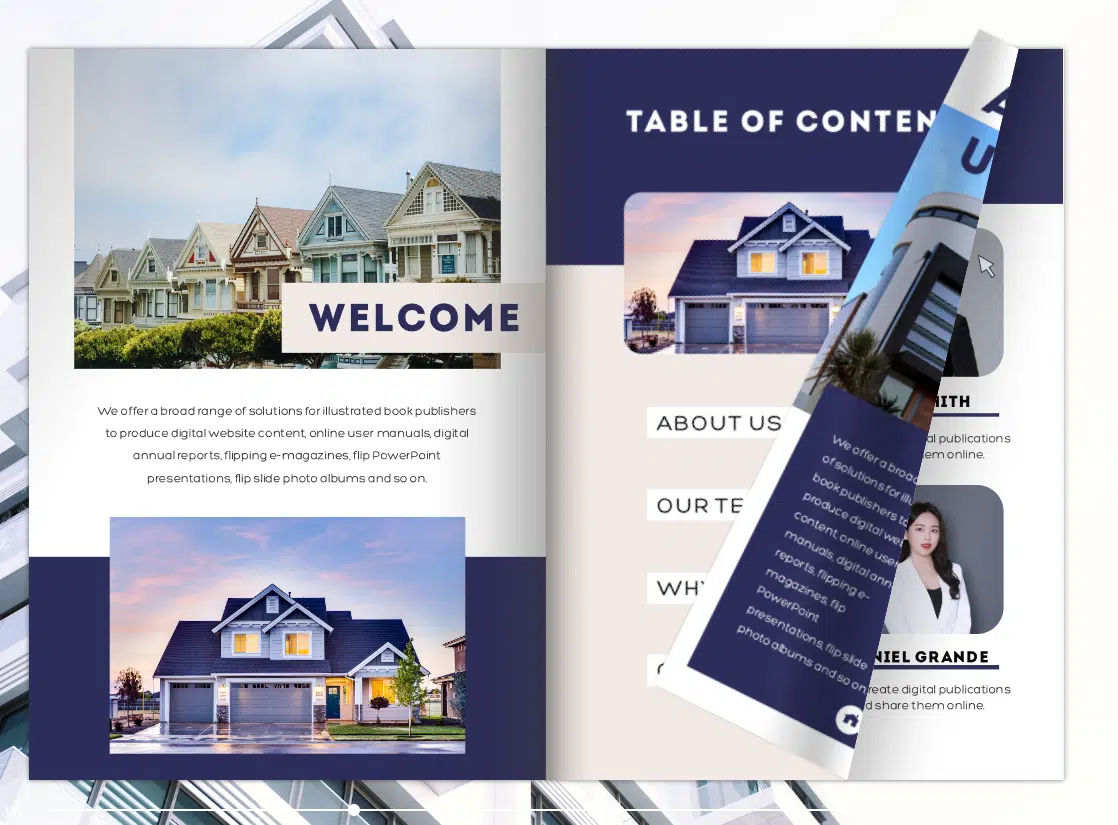
The Luxury Listing Brochure
Think full-bleed drone photography, minimal text, and a muted color palette. Every element screams exclusivity. The cover features a dramatic aerial shot, and interior spreads use a single hero image per page with just the essential specs. This format works brilliantly for high-end listings where the visuals sell the property.
The Community-Focused Brochure
Rather than focusing solely on one property, this format positions an entire neighborhood or development. It includes a community map, amenity photos, testimonials from current residents, and available floor plans. Ideal for developers and new construction projects.
The Multi-Property Portfolio
For agents with multiple active listings, a portfolio-style brochure showcases all available properties in one polished package. Each listing gets a dedicated spread with key details and a direct link to its full listing page. This is especially powerful when combined with interactive catalog features from FlipHTML5’s catalog functionality.
Browse more examples and templates in this collection of inspiring booklet examples and commercial real estate pitch deck strategies for additional presentation ideas.
Distributing Your Digital Property Brochure for Maximum Impact
Creating a beautiful brochure is only half the battle. Strategic distribution determines whether your marketing materials actually reach buyers.
Email Marketing
Segment your buyer list by property type, price range, and location preference. Send personalized brochure links with a compelling subject line. According to Campaign Monitor, real estate emails with rich media see 3x higher click-through rates.
Social Media Promotion
Post teaser images on Instagram and Facebook with a link to the full flipbook. Use carousel posts to showcase key pages. On LinkedIn, share the brochure as a case study of your marketing approach—this positions you as a thought leader and attracts referrals.
Open House Integration
Place QR codes at the entrance and in each room. When scanned, visitors land on the specific brochure page for that room—complete with specs, video, and additional photos they can’t see in person (like drone shots or seasonal views).
Website Embedding
Embed the flipbook directly on your property listing page. This keeps visitors on your site longer, reduces bounce rates, and improves SEO. Tools like FlipHTML5 generate responsive embed codes that work with any CMS. Learn more about turning PDFs into interactive content with this guide on how to turn a PDF into a flipbook.
Measuring Performance: What Metrics to Track
The beauty of digital marketing materials is measurability. Once your brochure is live, track these key metrics:
- Views: How many people opened your brochure
- Page-by-page engagement: Which pages readers spend the most time on
- Click-through rate: How many clicked your CTA, scheduled a showing, or visited external links
- Share rate: How often the brochure was forwarded or shared
- Device breakdown: Desktop vs. mobile vs. tablet viewing patterns
Use these insights to refine future brochures. If buyers consistently skip a section, rethink its placement or content. If a particular property photo generates high engagement, use similar photography in future listings.
Start Creating Your Digital Property Brochures Today
Real estate marketing has evolved, and agents who embrace digital property brochures gain a measurable competitive advantage. They’re faster to produce, cheaper to distribute, richer in content, and far more trackable than anything you could print.
The workflow is straightforward: plan your content, design your layout, convert to a digital flipbook, and distribute across every channel where your buyers spend time.
Ready to transform your property marketing? Try FlipHTML5 for free and create your first interactive digital property brochure in minutes. Upload your PDF, customize the design, and share a professional flipbook that makes every listing unforgettable.