
Print catalogs served businesses well for decades, but they come with real limitations: high printing costs, slow turnaround times, and zero analytics. Digital catalogs solve all of that. They’re cheaper to produce, easier to update, and you can track exactly how people interact with them. Whether you’re showcasing products, sharing a seasonal collection, or building an internal resource library, digital catalogs are the smarter choice.
This guide walks you through everything you need to know about creating digital catalogs—from planning and design to publishing and distribution.
What Is a Digital Catalog?

A digital catalog is an electronic version of a traditional product or service catalog that can be viewed on computers, tablets, and smartphones. Unlike static PDFs, modern digital catalogs often include interactive elements like clickable links, embedded videos, animations, and page-flip effects that mimic the experience of browsing a physical book.
They’re used across industries—retail, manufacturing, education, hospitality, real estate—anywhere you need to present multiple items or services in an organized, browsable format. For real-world inspiration, check out these inspiring digital catalog examples from top e-commerce brands.
Why Go Digital? Key Benefits
- Cost savings – No printing, shipping, or warehousing expenses. Update your catalog anytime without reprinting.
- Wider reach – Share via link, email, social media, or embed directly on your website. Anyone with internet access can view it.
- Interactivity – Add clickable product links, videos, animations, and hotspots to make browsing engaging.
- Analítica – Track views, time spent per page, click-through rates, and popular products to understand customer behavior.
- SEO value – Online catalogs can be indexed by search engines, driving organic traffic to your content.
- Eco-friendly – Reduce paper waste and your environmental footprint.
Step 1: Plan Your Catalog Content
Before touching any design tool, get your content strategy right.
Define Your Purpose
What is this catalog for? A seasonal product showcase? A wholesale price list? A service menu? Your purpose shapes everything—layout, tone, level of detail, and call-to-action placement.
Know Your Audience
A B2B catalog for distributors looks very different from a B2C lifestyle catalog. Consider what your audience needs: technical specs vs. lifestyle imagery, pricing transparency vs. “contact for quote,” detailed descriptions vs. visual-first browsing.
Organize Your Structure
Group products or services into logical categories. Plan your page flow:
- Cubrir – Brand identity and catalog theme
- Tabla de contenido – Navigation aid, especially for longer catalogs
- Category sections – Grouped product/service pages
- Product pages – Images, descriptions, prices, CTAs
- Back cover – Contact info, social links, website URL
Need ideas for structuring your pages? Browse these ideas de diseño de catálogo to find a structure that works for your products.
Prepare Your Assets
Gather high-resolution product images, descriptions, pricing, SKUs, and any brand assets (logos, color codes, fonts). The better your raw materials, the smoother the design process.
Step 2: Choose the Right Tool

Your choice of tool depends on your technical skill level, budget, and how interactive you want the final product to be. If you want a detailed comparison, see our roundup of the best catalog management software on the market.
Option A: Design from Scratch
Tools like Adobe InDesign or Canva let you build catalog layouts from the ground up. This gives maximum creative control but requires design skills and more time.
Option B: Use a Digital Catalog Maker
Dedicated platforms like FlipBuilder let you convert existing PDFs into interactive, page-flipping digital catalogs in minutes. Upload your PDF, and the software automatically generates a realistic flipbook with smooth page-turn effects. This is the fastest route if you already have catalog content in PDF format.
FlipBuilder offers both a desktop solution (Flip PDF Pro) and a cloud-based platform (FlipHTML5), giving you flexibility depending on whether you prefer offline or online workflows. You can even use the Creador de catálogos con IA to speed up the creation process.
Looking for more options? Here’s our list of 8 free catalog maker software picks, or check out the top 8 online catalogue makers for browser-based solutions.
Option C: Template-Based Approach
Many catalog makers offer pre-designed templates. Pick one that fits your industry, swap in your content, and customize colors and fonts to match your brand. It’s the sweet spot between speed and customization. FlipHTML5 has a dedicated catalog template library to get you started quickly.
You can also download free product catalog templates to kickstart your design.
Step 3: Design Your Catalog
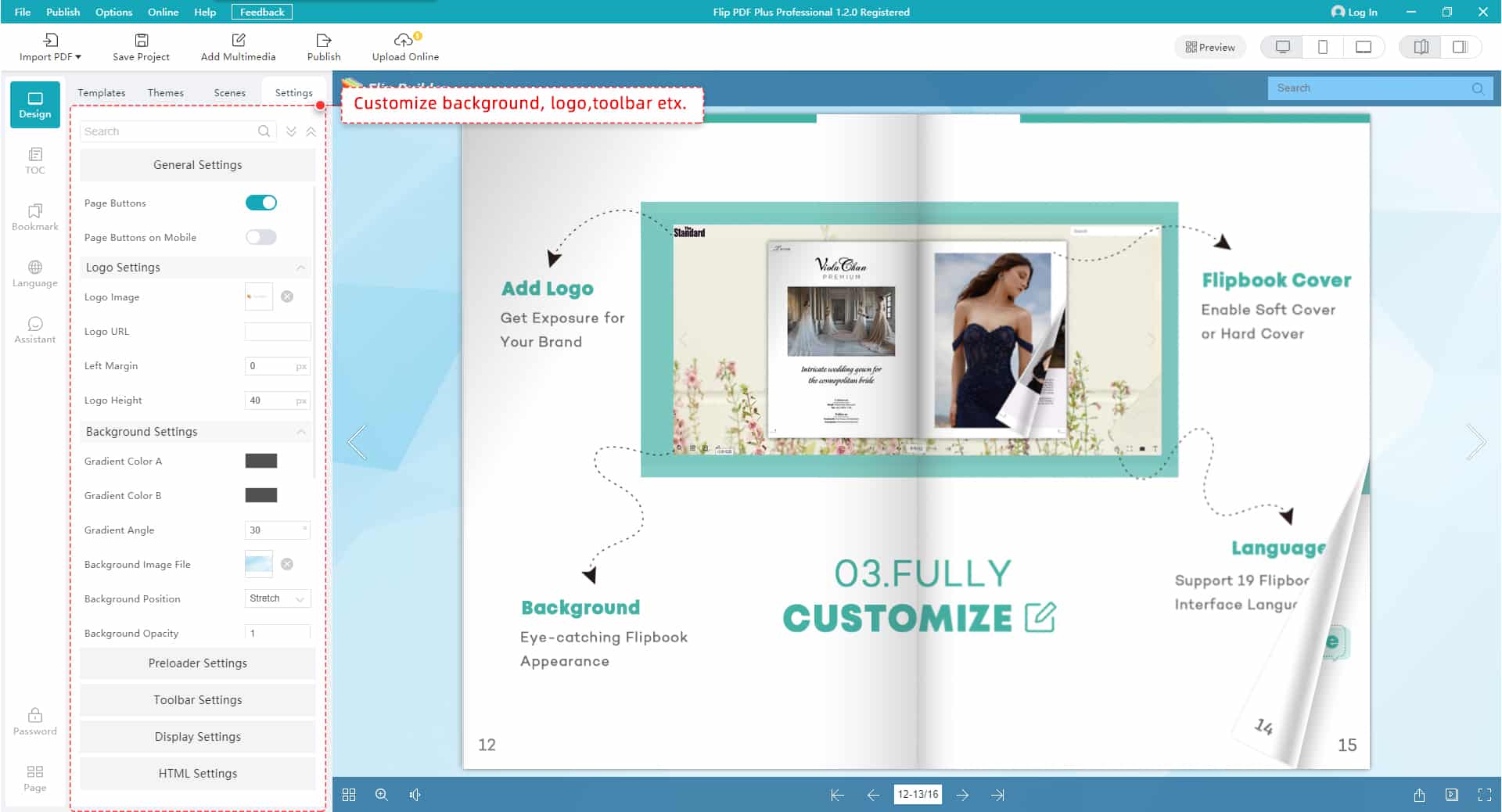
Good catalog design balances aesthetics with usability. Here are the principles that matter most:
Keep It Clean
Resist the urge to cram every page with content. White space improves readability and makes your products stand out. A cluttered catalog feels overwhelming; a clean one feels premium.
Use Consistent Branding
Stick to your brand’s color palette, fonts, and visual style throughout. Consistency builds trust and makes your catalog look professional.
Prioritize Photography
Product images sell. Use high-quality photos with consistent lighting and backgrounds. Show products from multiple angles where possible. If budget allows, include lifestyle shots that show products in use.
Write Clear Descriptions
Every product entry should include:
- Product name
- Brief, benefit-focused description
- Key specifications
- Price (if applicable)
- Clear call-to-action (Buy Now, Learn More, Add to Cart)
For cover design inspiration, take a look at these ideas de diseño de portada de catálogo that make a strong first impression.
Design for Mobile
A significant portion of your audience will view the catalog on phones. Ensure text is readable at smaller sizes, buttons are tappable, and the layout adapts to different screen sizes.
Step 4: Add Interactive Elements
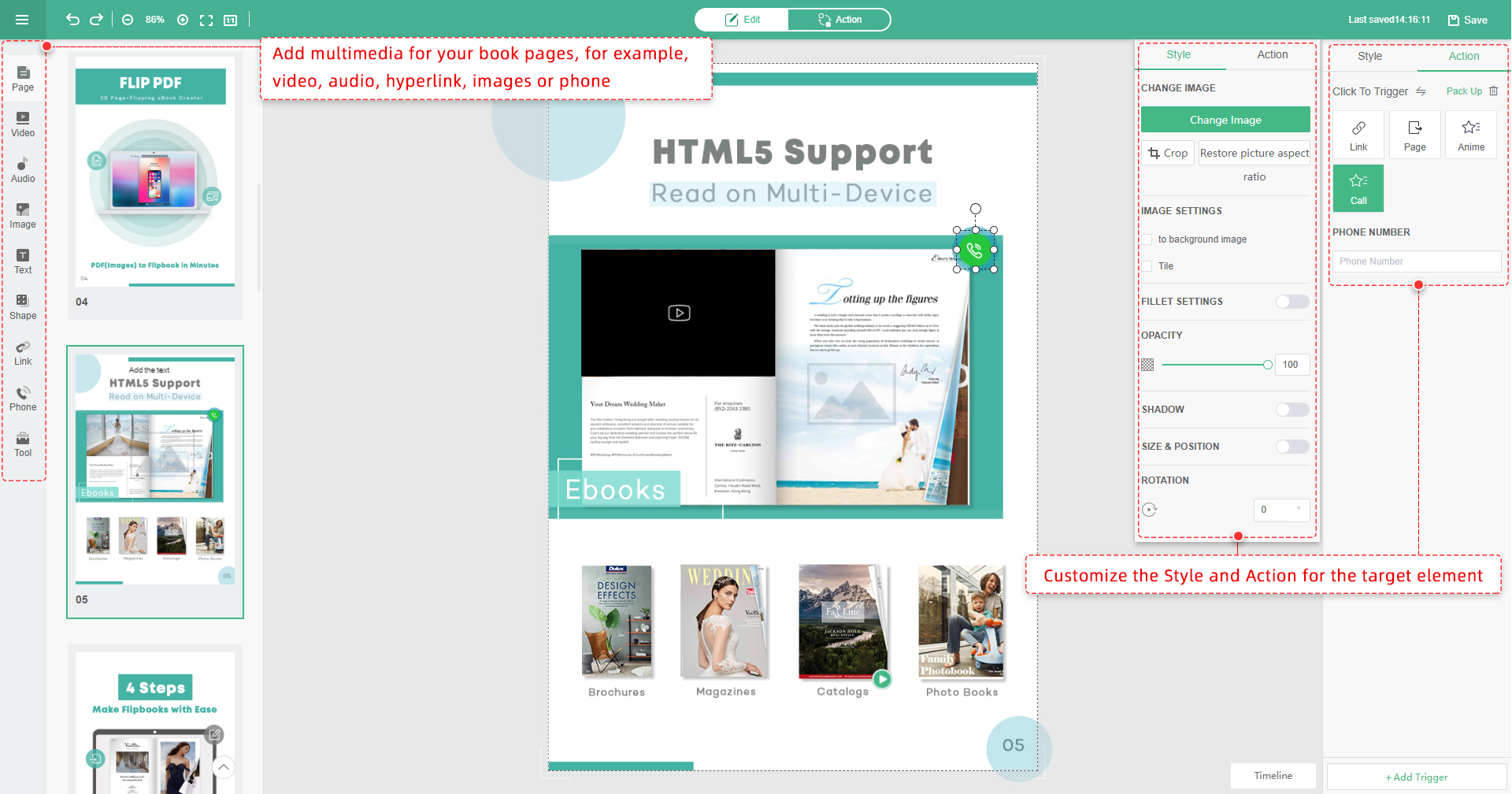
This is where digital catalogs truly outshine print. Interactive features transform passive browsing into active engagement.
- Clickable links – Link products directly to your e-commerce pages for instant purchasing.
- Embedded videos – Product demos, unboxing videos, or brand stories add depth.
- Image hotspots – Let viewers click on specific areas of an image to reveal product details or pricing.
- Audio – Background music or narration for a more immersive experience.
- Animations – Subtle entrance effects or hover states that draw attention to key items.
- Search functionality – Let readers quickly find specific products without scrolling through every page.
Con FlipBuilder tools, adding these elements is straightforward—use the built-in multimedia editor to drag and drop videos, links, images, and animations onto any page. Explore the full catalog features to see what’s possible.
Want to dive deeper into interactivity? Read our guide on how to create an interactive digital catalog to boost sales.
Step 5: Publish and Share
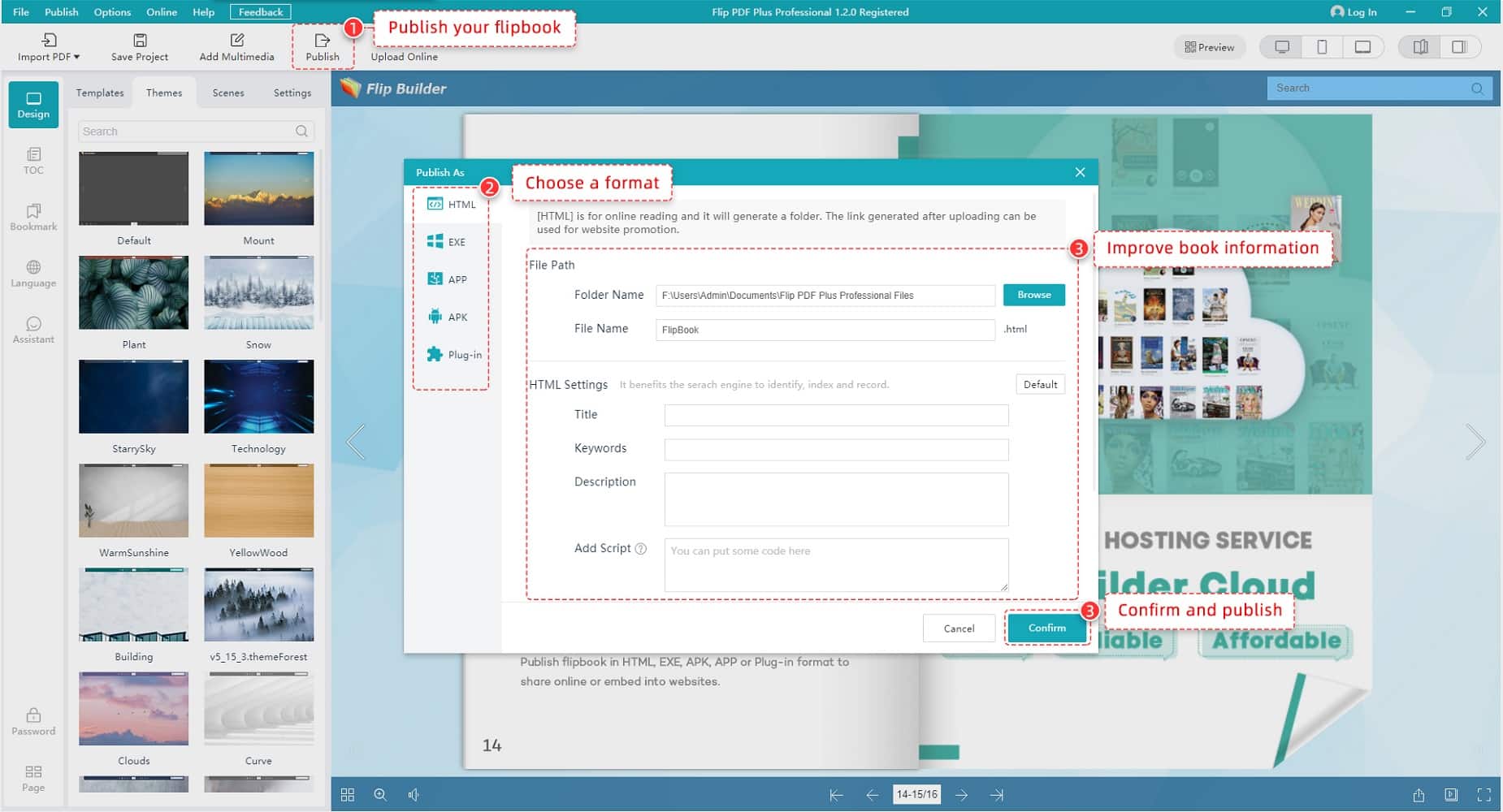
Once your catalog is ready, you need to get it in front of people.
Online Hosting
Publish your catalog to the cloud so it’s accessible via a shareable URL. Platforms like FlipHTML5 provide free hosting with custom domain options, making it easy to share without managing your own servers.
Website Embedding
Embed the catalog directly on your website using an iframe or embed code. This keeps visitors on your site while giving them the full interactive catalog experience.
Email Distribution
Share the catalog link in email campaigns. Include a compelling thumbnail or GIF preview to boost click-through rates.
Social Media
Post the catalog link on your social channels. Create teaser content—short videos or image carousels—that link back to the full catalog.
Offline Access
Some tools let you export catalogs as standalone HTML files or apps for offline viewing—useful for trade shows, sales meetings, or areas with limited connectivity.
For a complete walkthrough, FlipHTML5’s electronic catalog solution guide covers the full publishing workflow.
Step 6: Track Performance and Optimize
The beauty of digital catalogs is measurability. After publishing, monitor:
- Total views and unique visitors – How many people are seeing your catalog?
- Average time spent – Are people actually reading or just skimming?
- Most viewed pages – Which products or sections attract the most attention?
- Click-through rates – Which links and CTAs are performing?
- Geographic data – Where are your readers located?
Use these insights to refine future catalogs. Double down on what works, redesign what doesn’t.
Tips for Creating Catalogs That Convert
- Lead with your best products. First impressions matter. Put your top sellers or newest items up front.
- Use urgency. Limited-time offers, seasonal tags, or “new arrival” badges encourage action.
- Make CTAs obvious. Every page should have a clear next step—whether it’s “Shop Now,” “Request a Quote,” or “Download Spec Sheet.”
- Keep file sizes manageable. Optimize images so your catalog loads quickly, especially on mobile.
- Update regularly. A digital catalog that’s a year old loses credibility. Set a schedule—quarterly or seasonal updates work well for most businesses.
- A/B test. Try different cover designs, product arrangements, or CTA placements to see what drives better engagement.
Wrapping Up
Creating a digital catalog doesn’t have to be complicated. With the right planning, a solid tool, and attention to design and interactivity, you can produce a catalog that looks great, engages your audience, and drives real business results.
The shift from print to digital isn’t just about saving money—it’s about creating a better experience for your customers while gaining insights that print could never provide. Start with what you have, even if it’s just a basic PDF, and build from there. Tools like FlipBuilder make it simple to transform static documents into interactive digital catalogs that your audience will actually enjoy browsing.
Ready to get started? Sign up for free and create your first digital catalog today.